|
|
|
| |
|
iSpot
Managed AAA & Billing services |
|
 |
|
We offer
AAA/Billing services through our hosted flagship product
Hotspot Express Subscriber and Billing Management Software
With iSpot
We manage
Network Services
-
Hotspot
Express manages WiFi network through
Internet from 24X7 Data Centers
-
We
deliver Authentication & Billing Services
-
Thorough
Central Servers, we bring cost of network
management to a fraction
-
We can
manage both wired/wireless networks
With our
hosted servers to anywhere in the world, we can serve any
customer across the globe be it a single café or motel or
café chain. We have ability to manage multiple currencies
across the globe.
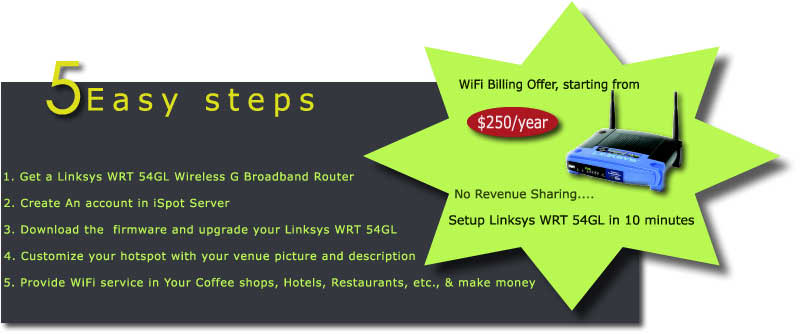
How to upgrade the firmware on a Linksys WRT
54GL Router (or contact us, we will configure it for you)
Flashing the firmware on a router is risky.
You may end up "bricking" your router even if you
carefully follow instructions. If you brick your router,
don't call us - there's nothing that can be
done. The following instructions are for the Linksys WRT
54GL Wireless G Broadband Router.
-
Downloaded the firmware from
http://hotspotexpress.in/openwrt-wrt54g-squashfs.bin
and configuration file
http://hotspotexpress.in/config.tgz .
-
Power up the Linksys WRT 54GL.
-
Connect your computer or laptop wirelessly
or using one of the four wired ports to the AP.
It should give you an IP address in the 192.168.1.0/24
range. Make sure that you can reach
the internet and browse the web.
-
Direct your browser to "http://192.168.1.1".
The factory default username and password
for the Linksys WRT 54GL Wireless G Broadband Router are "admin"
and "admin". You are
now in the Linksys WRT 54GL Wireless G Broadband Router
setup console.
-
Change the LAN IP as 192.168.100.1 , save
and reboot Linksys WRT 54GL
-
On the Wireless G Broadband Router,
connect the port labeled "INTERNET" to any internet
connection you have (DSL, cable modem, ethernet, etc.,).
-
Select "Administration" and then "Firmware
Upgrade".
-
Click "Browse" and select the file
containing the firmware named "openwrt-wrt54g-squashfs.bin"
that you
downloaded previously.
-
Click "Upgrade" and wait for the
process to complete (about one minute) and then for the
Linksys WRT 54GL
Wireless G Broadband Router to reboot (about another
minute - finished when the
DMZ light turns off)
-
If you are connected wirelessly, look for
the "iSpot" SSID and select it. You may need to "refresh
your
wireless networks" and/or "repair your connection" (renew
your DHCP lease).
You should receive an IP address in the 192.168.100.0/24
range.
-
Connect to "http://192.168.100.1"
and enter the new password for the Linksys
WRT 54GL Wireless G Broadband Router twice.
-
Select "System" and then "Config
management" and select the file containing the
firmware named "config.tgz"
that you downloaded previously.
-
Click "Submit"
-
Go to your
iSpot console "http://console.ispot.in/login"
, login with your account credentials and click "Personal
Data"
and note down the Location Name
-
Select "Hotspot", then "Configuration"
and enter the Location Name that you noted from
iSpot console and save
|
You want ... to provide wireless Internet Access for your guests, clients, visitors etc., but you want to remain in control of who and when somebody is using your Internet Service. You might want to make this a billable service or a value added service as part of your e.g. room charges. Be in control with whom you share your wireless Internet connection!
Our solution: Internet Access Control with Username and Password
we exclusively designed to enable the instant set-up of worry-free, controlled-access, revenue-generating WiFi services for your business. Each turnkey solution features web-based authentication, remote management and plug-n-play configurations
... simply use one of our Access Gateways, connect it to your Internet connection and start providing controlled wireless Internet Access.
We provide all the facilities like
- Web-based Control Panel Access at
http://www.console.ispot.in
- You manage all of your online users
- Customised Access Packages, e.g. 30min, 1h, 2h, 1 day etc
- 'Prepaid' Access Cards by the minute, e.g. 30min, 1h, 2h, 10h etc [optional]
- Bandwidth Control per user or site
- User Online/Offline/Expired/Suspended Status Monitor
- Server Status Monitor, monitoring our US based redundant servers
- Gateway Status Monitor, monitoring the gateway at your location
If a single wireless Gateway is not sufficient to cover your Building, Compound, Marina, Stadium etc
Simply add a number of wireless Access Points. Access points do not have to be wired to the main gateway. Just
plug in the powercord and keep them within wireless reach of the main gateway or another wireless access point. Building a 'mesh' network, just like a cellular network for mobile telephony.
|
|
iSpot
Features |
Benefits |
|
Hosted Authentication & Billing Services |
Reduced Billing /Database functions at customer end
saving money and time |
|
Web based Interface |
No configuration change on the Client laptop; Truly
plug & play |
LINUX Kernel for AAA functions
|
Extremely reliable services |
|
Simple Pre-Paid Model |
Easy to Manage |
|
Tariff plans based on Time or Volume or Speed
|
Controlled usage of the broadband to all users. Ease
of managing business |
|
Business Administrator |
Being a Business Administrator, customer has
absolute control over Tariff Plans including
complementary services |
|
URL redirection |
Better visibility of your product and services |
|
Hosted Authentication & Billing Services |
Reduced Billing /Database functions at customer end
saving money and time |
|
Media Independence |
Ideally suited for managing both wired and wireless
networks |
|
Captive Portal |
Every single packet being sent/received is captured
resulting in better management of users/resources |
|
Walled Garden |
Redirection to specific Websites/Messages/Promotions |
|
Inactive Timer |
The precious bandwidth is optimally utilized |
|
|
The prime objective of the product is having AAA/Billing as service to reduce the
initial investments. Through iSpot,
we not only secure the WiFi but enable you to run the WiFi business the
way you want including complementary billing services.
|
|
 |
|
The
philosophy behind iSpot is to minimize the initial
investment to enable a Café/Restaurant/Service Apartment to
turn WiFi not just a value added service but a profitable
revenue stream. |
|
 |
|
Technology
Our gateways provide wireless IEEE 802.11b/g/n etc. (11Mbps, 54Mbps, 700Mbps) and wired controlled Internet access. We are using Linksys and other wireless routers including appliances and PC based servers with modified software (DD-WRT, OpenWRT, RouterOS
...) in connection with our centralized US based servers.
In addition to our online Control Panel servers, we operate redundant dedicated servers for the authentication, authorization and accounting (AAA) process.
In case you already have an existing wireless network,
but do not have sufficient access control or too complicated
set up based on MAC addresses, you can simply use our
Internet Access Gateway (Internet Access Control Appliance)
to start getting in control again |
|
|
|

|
|